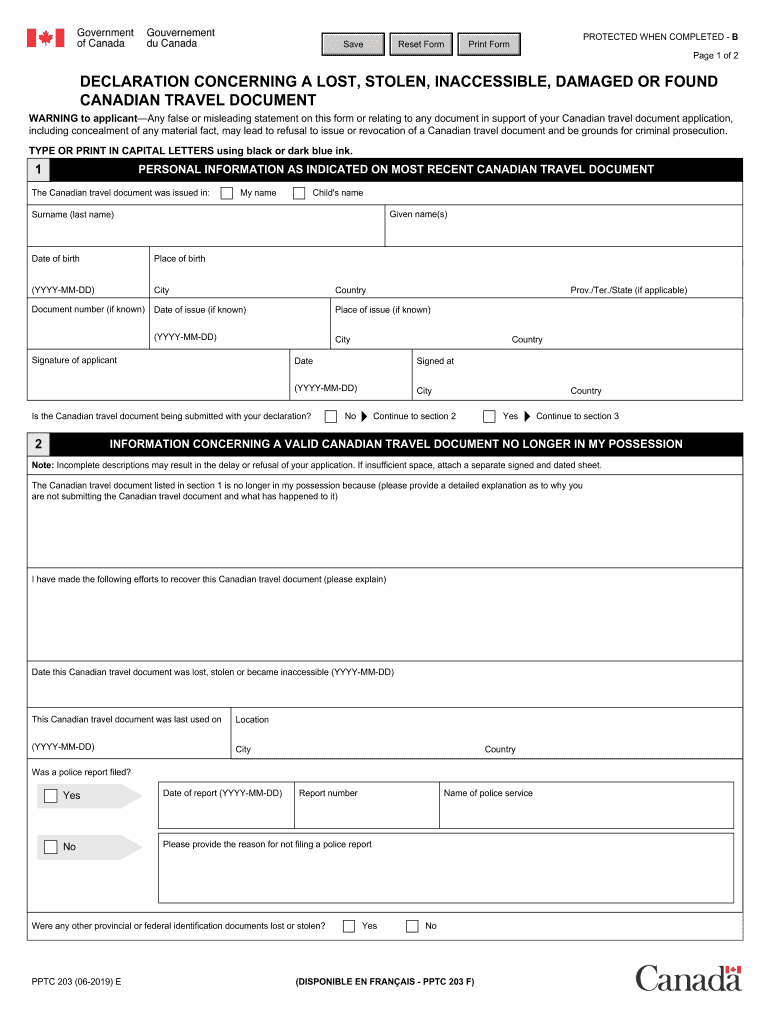
PDF PPTC 203 E Declaration Concerning a Lost, Stolen, Inaccessible 2019


Understanding the PPTC 203 Form
The PPTC 203 form, also known as the declaration concerning a lost, stolen, or inaccessible Canadian passport, is a crucial document for individuals who have lost access to their passport. This form is an essential step in the process of obtaining a replacement passport, ensuring that the loss is officially recorded and that the individual can proceed with their application for a new passport. It serves to declare the circumstances surrounding the loss and is a requirement for those seeking to restore their travel documents.
Steps to Complete the PPTC 203 Form
Completing the PPTC 203 form involves several steps to ensure accuracy and compliance with Canadian regulations. First, gather all necessary personal information, including your full name, date of birth, and any previous passport details. Next, clearly describe the circumstances of the loss or theft of your passport. It is important to provide as much detail as possible, including when and where the incident occurred. After filling out the form, review it for any errors or omissions before signing and dating it. Finally, submit the completed form along with your passport application to the appropriate authorities.
Legal Use of the PPTC 203 Form
The PPTC 203 form is legally recognized as a declaration of the circumstances surrounding the loss of a passport. When filled out correctly, it holds legal weight and can be used in conjunction with other documents to facilitate the issuance of a new passport. Compliance with the legal requirements outlined in the form is essential, as failure to provide accurate information can lead to delays or denials in the passport application process. It is advisable to keep a copy of the completed form for your records.
Obtaining the PPTC 203 Form
The PPTC 203 form can be obtained through official Canadian government sources. It is available online in a PDF format, which can be downloaded and printed for completion. Additionally, individuals can request a physical copy of the form from Canadian embassies or consulates if they are outside of Canada. Ensuring that you have the most current version of the form is important, as outdated forms may not be accepted during the application process.
Key Elements of the PPTC 203 Form
Several key elements must be included when completing the PPTC 203 form. These include personal identification details, a clear statement regarding the loss or theft of the passport, and a declaration of the circumstances surrounding the incident. The form also requires the applicant's signature and date, affirming the truthfulness of the information provided. It is important to ensure that all sections of the form are filled out completely to avoid any issues with the passport application.
Form Submission Methods
The completed PPTC 203 form can be submitted through various methods, depending on the applicant's location and preference. In Canada, individuals can submit the form along with their passport application in person at designated passport offices or by mail. For those outside of Canada, submissions can typically be made at Canadian embassies or consulates. It is crucial to follow the specific submission guidelines provided with the form to ensure timely processing of the passport application.
Quick guide on how to complete pdf pptc 203 e declaration concerning a lost stolen inaccessible
Complete PDF PPTC 203 E Declaration Concerning A Lost, Stolen, Inaccessible smoothly on any device
Digital document management has gained traction among businesses and individuals. It offers a fantastic eco-friendly substitute to conventional printed and signed paperwork, as you can easily obtain the correct form and securely keep it online. airSlate SignNow provides all the resources necessary to create, modify, and eSign your documents swiftly without any hold-ups. Manage PDF PPTC 203 E Declaration Concerning A Lost, Stolen, Inaccessible on any device with airSlate SignNow's Android or iOS applications and enhance any document-related task today.
The easiest method to adjust and eSign PDF PPTC 203 E Declaration Concerning A Lost, Stolen, Inaccessible seamlessly
- Obtain PDF PPTC 203 E Declaration Concerning A Lost, Stolen, Inaccessible and click on Get Form to begin.
- Utilize the features we offer to complete your form.
- Emphasize important sections of the documents or obscure sensitive information with specialized tools provided by airSlate SignNow.
- Create your signature using the Sign tool, which takes mere seconds and carries the same legal validity as a conventional wet ink signature.
- Review all the details and click on the Done button to save your modifications.
- Choose your preferred delivery method for your form, whether by email, text message (SMS), invitation link, or download it to your computer.
Eliminate concerns about lost or misplaced documents, frustrating form navigation, and errors that necessitate printing new document copies. airSlate SignNow fulfills all your document management needs in just a few clicks from any device of your choice. Edit and eSign PDF PPTC 203 E Declaration Concerning A Lost, Stolen, Inaccessible and ensure outstanding communication at every step of the form preparation process with airSlate SignNow.
Create this form in 5 minutes or less
Find and fill out the correct pdf pptc 203 e declaration concerning a lost stolen inaccessible
Create this form in 5 minutes!
How to create an eSignature for the pdf pptc 203 e declaration concerning a lost stolen inaccessible
The best way to make an eSignature for a PDF file online
The best way to make an eSignature for a PDF file in Google Chrome
The way to create an electronic signature for signing PDFs in Gmail
The way to generate an eSignature straight from your mobile device
How to make an eSignature for a PDF file on iOS
The way to generate an eSignature for a PDF document on Android devices
People also ask
-
What is pptc 203 and how does it relate to airSlate SignNow?
Pptc 203 is a regulatory framework that enhances digital document handling and e-signatures. It aligns perfectly with the capabilities of airSlate SignNow, enabling businesses to securely manage and sign documents online while ensuring compliance.
-
How does airSlate SignNow ensure compliance with pptc 203?
AirSlate SignNow integrates compliance features that adhere to the standards set by pptc 203. Our platform employs robust encryption, secure storage, and an audit trail to ensure all e-signatures and document processes meet regulatory requirements.
-
What are the pricing plans for airSlate SignNow?
AirSlate SignNow offers a variety of pricing plans tailored to meet different business needs, all optimized to support compliance with pptc 203. Whether you're a small business or a large organization, you can find a plan that suits your document signing needs without breaking the bank.
-
What features does airSlate SignNow provide for users concerned about pptc 203?
AirSlate SignNow includes features such as advanced authentication methods, customizable templates, and comprehensive reporting tools. These features are designed to align with the requirements of pptc 203, ensuring your document signing process is secure and efficient.
-
Can airSlate SignNow integrate with other software platforms?
Yes, airSlate SignNow easily integrates with a range of popular applications like CRM systems and project management tools. These integrations streamline the workflow, making it easier to manage documents in accordance with pptc 203 and enhance productivity.
-
How does airSlate SignNow benefit businesses managing documents under pptc 203?
AirSlate SignNow empowers businesses to reduce manual processes and increase efficiency while managing compliance with pptc 203. By automating document workflows, companies can save time and minimize errors, allowing for smoother transactions and better resource allocation.
-
Is there a mobile app for airSlate SignNow that supports pptc 203 compliance?
Yes, airSlate SignNow offers a mobile app that enables users to manage documents on the go while ensuring compliance with pptc 203. This flexibility allows you to send and sign important documents anytime, anywhere, without compromising security.
Get more for PDF PPTC 203 E Declaration Concerning A Lost, Stolen, Inaccessible
Find out other PDF PPTC 203 E Declaration Concerning A Lost, Stolen, Inaccessible
- How Do I Electronic signature Georgia Doctors Purchase Order Template
- Electronic signature Doctors PDF Louisiana Now
- How To Electronic signature Massachusetts Doctors Quitclaim Deed
- Electronic signature Minnesota Doctors Last Will And Testament Later
- How Do I Electronic signature Oregon Construction Business Plan Template
- How Do I Electronic signature Oregon Construction Living Will
- Electronic signature New York Doctors Permission Slip Free
- Electronic signature South Dakota Construction Quitclaim Deed Easy
- Electronic signature Texas Construction Claim Safe
- Electronic signature Texas Construction Promissory Note Template Online
- How To Electronic signature Oregon Doctors Stock Certificate
- How To Electronic signature Pennsylvania Doctors Quitclaim Deed
- Electronic signature Utah Construction LLC Operating Agreement Computer
- Electronic signature Doctors Word South Dakota Safe
- Electronic signature South Dakota Doctors Confidentiality Agreement Myself
- How Do I Electronic signature Vermont Doctors NDA
- Electronic signature Utah Doctors Promissory Note Template Secure
- Electronic signature West Virginia Doctors Bill Of Lading Online
- Electronic signature West Virginia Construction Quitclaim Deed Computer
- Electronic signature Construction PDF Wisconsin Myself